



Dear ArtGrid Users, We regret to inform you that we won’t be providing further updates for ArtGrid and the app is no longer available for download. We apologise for any inconvenience and thank you for using ArtGrid.
Jackson’s ArtGrid – The Composition App for Tablet Devices

ArtGrid is brilliantly designed for use with a tablet device, the app allows you to take fresh images or upload existing ones and apply a grid to it at any scale you wish. You can then input the size of the canvas you wish to transfer onto, in inches or mms. ArtGrid will advise you on the right grid size to mark onto your canvas for successful image transfer. Your measurements will be more accurate without having to do the maths!
Images can also be scaled down, flipped around and rotated.
The App works as a fantastic view finder and will help you to decide how much of a subject you wish to include in a composition, as well as assess how a composition may fit within a certain shaped canvas.
If you need to share your gridded design you have the choice to print, save or share.
ArtGrid will save you from annoying measuring errors as well as save you time and effort. We’re pretty certain Da Vinci would have loved it!
Watch this video to see ArtGrid in action:
ArtGrid User Reviews
Download ArtGrid, give it a try and leave a review on the app. We’d love to hear your feedback!
“5-Stars. Does everything I need. Easily zooms in on the photo, easily adjust the grid size, add extra grid lines without any issues. A few quick simple adjustments and I am done. All on my iPad, perfect.”
– Ray1974, Appstore reviewer, March 2015
“5-Stars. Amazing art assist! Have just downloaded this app from seeing a link on you tube. Have tried it out with one of my photos and it looks good. Next step….do the drawing!”
– Mogsy A, Android reviewer, March 2015
We Have Also Added a Greyscale Function
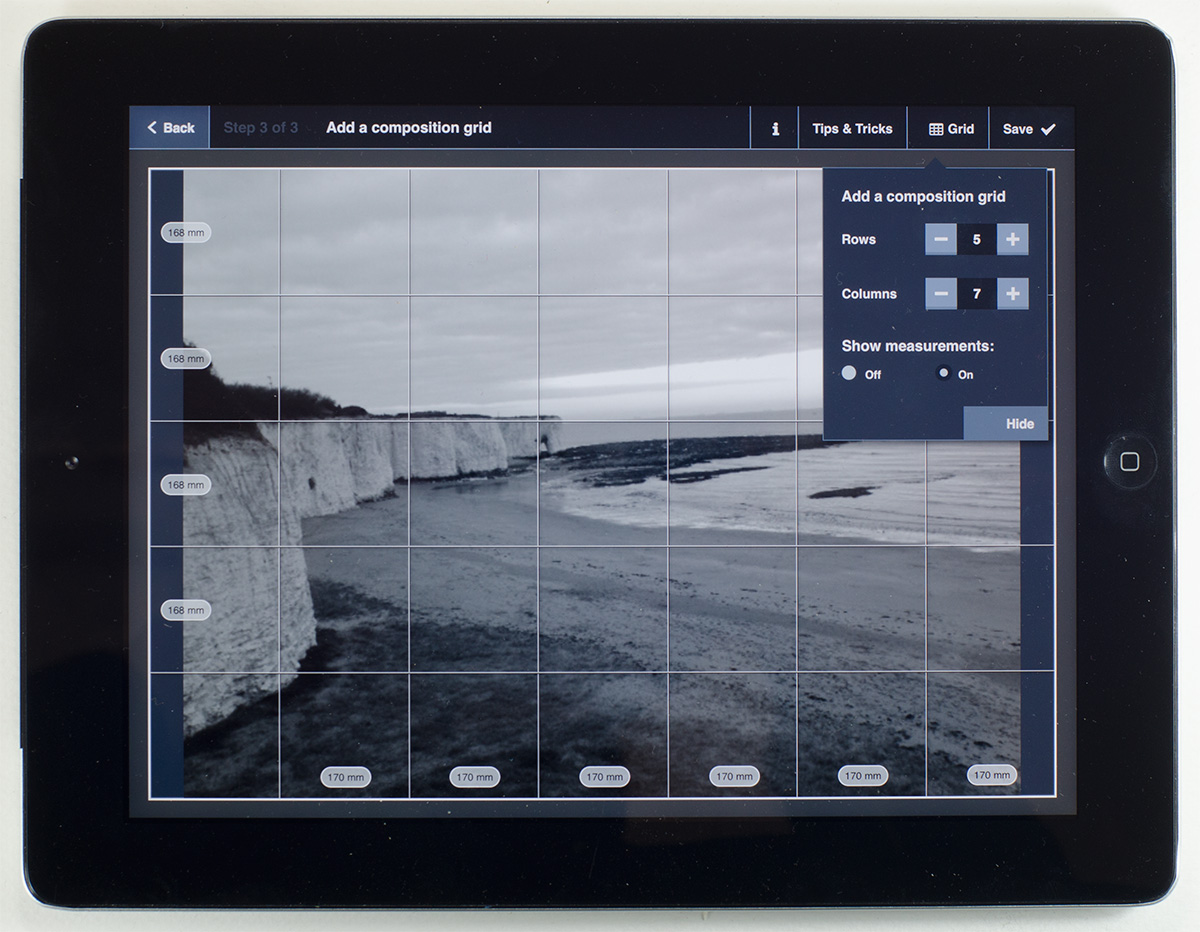
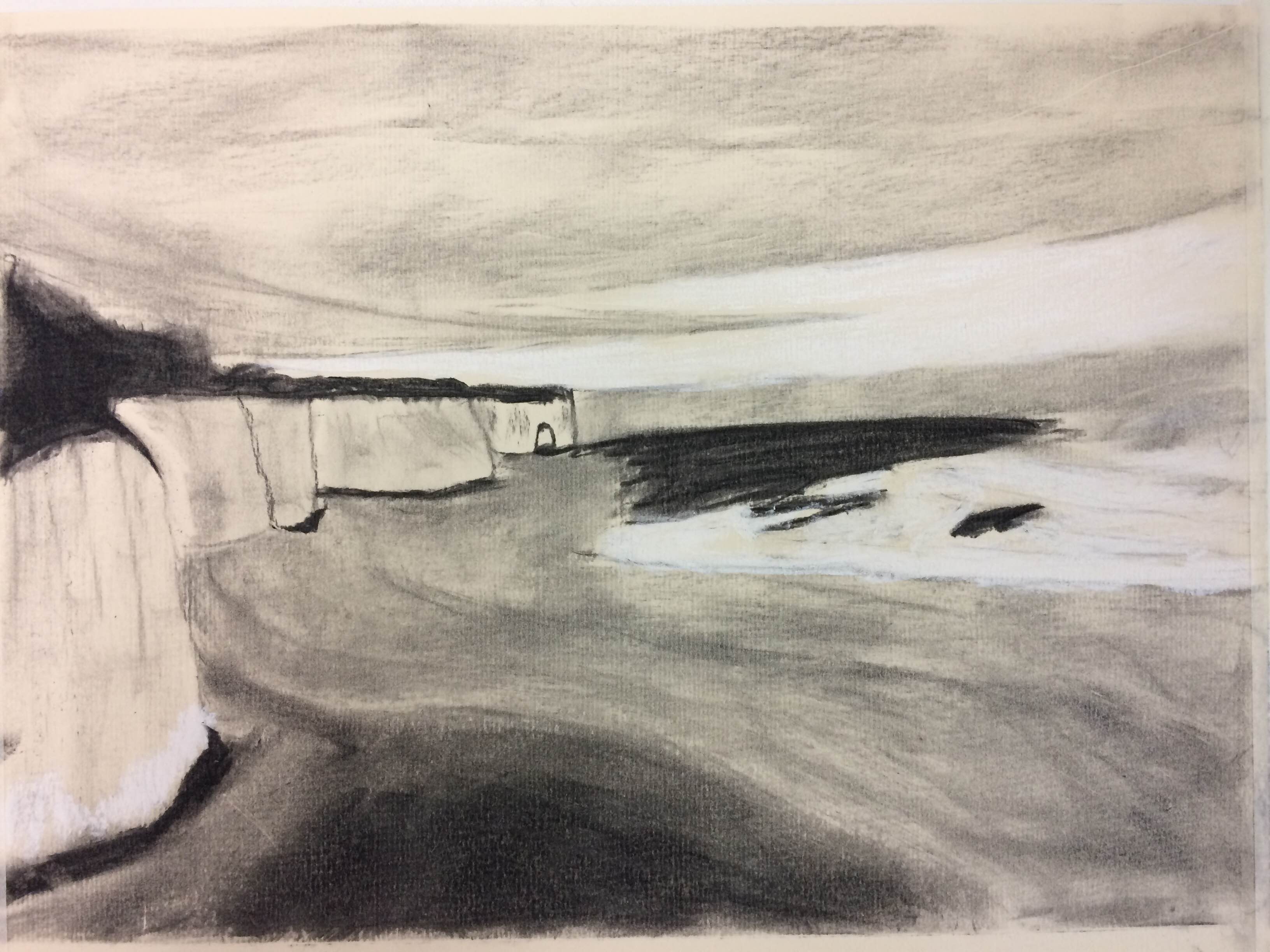
The greyscale button will help you to see your image’s tonal values.


147 thoughts on “Turn your Tablet into an Artist’s Tool”
Not compatible with my HTC 🙁
Hi,
Thanks for getting in touch. Is your HTC a tablet or smartphone? ArtGrid should be compatible with all android tablets, so if you give us a few more details about your device we can look into the issue for you.
Thanks,
Danielle
The ArtGrid app is not compatible with my following devices:
Google Nexus 10 tablet, running Android 5.1.1
Google Nexus 7 tablet, running Android 5.1.1
HTC One (M8) phone, running Android 5.0.2
HTC One X phone, running Android 4.2.2.
It does, however, work on my:
Samsung Galaxy Tab 2, running Android 4.4.2
When will it be updated to be compatible with the other devices/systems?
Hi John,
We have no plans to update the app to become compatible with any mobile device however we hope to make the app compatible with all tablets in the very near future. Thank you for your feedback.
Regards,
Danielle
Hi. I have problems with the Art Grid on my Samsung Galaxy Tab 2 10.1 (GT-P5110) Android 4.2.2. I can set up and save 2 projects. I can set up a third project but when attempting to save it it times out returning a message that Art Grid has stopped working. When re-opening Art Grid only the 1st 2 projects are available ie only the 1st 2 are saved. Any suggestions?
Hi Mike
I asked our manager about your issue and he has told me that Android has so many variations it’s impossible for us to keep up to date and pay for updates. We will be introducing a payment for the app at the end of the week so that we can pay the developers to move forward with the app. I’m sorry but it looks like we are not able to help with your problem I’m afraid.
381 very intelligent idea thankyou very much
,
Will your Art Grid be ok on my Amazon
Fire Tablet ??
Hi Shuna, Art Grid is only available on Apple App Store and Google Play Store, not Amazon’s Appstore. That said there may be ways to install Google’s Play Store on your Fire Tablet, so I would first check to see whether your device supports downloading it. Best of luck!
Can I get it to show inches?
Hi Tracy, you can select inches for your canvas size no problem – we are working on an update that lets you use inches when adding the composition grid, among other new features. We’re hoping to bring this update out as soon as we can!
OK you’ve convinced me I need a wifi printer!
Good app – except for the fact you can’t go back in and edit your settings once saved and I’m not keen on the “print or share” as an end option – I find that a bit oppressive.
Add in “not right now” at the end and you’ll have a winner.
I have just tried to download it on my iPad and am told it’s not available in Ireland. Is there any chance it could be made available as I would love to use I and leave a review.
Hi Yvonne,
Thanks for getting in touch. It should be available in Ireland, please try downloading it from this direct link: https://itunes.apple.com/us/app/artgrid-by-jacksons/id940145823?mt=8 If you are still having problems, please let me know.
Kind regards,
Danielle
Thanks Danielle that worked so I now have it. Have had a quick look and it looks good 🙂
I found an ArtGrid app, but it was not free.
Hi Debra,
Thanks for getting in touch.
Are you sure you tried to download ArtGrid by Jackson’s? Try using this direct link https://itunes.apple.com/us/app/artgrid-by-jacksons/id940145823?mt=8. In addition, you will only be able to download it on a tablet, it is not compatible with mobile phones, iphones or smartphones.
Let me know if you are still having problems.
Kind regards,
Danielle
Hi – thought this would be really useful, so downloaded to my iPad. Unfortunately I have all my photos on Photo Manager Pro and it appears I can’t access those photos from your app, only the ones on the “photo” app already installed on the iPad. Is there any way around this, or do I need to reload any photo I want to use on the iPad photo app? Really hope there is a way around this to enable accessing my photographs directly.
Hi Lynn,
I have answered your question on facebook. Unfortunately the only way to get your photographs onto the app is to transfer them all to you ipad photos.
Kind regards,
Danielle
Thanks Danielle
Can’t move photos from photo manager to photos, so will have to wait until I can access a laptop to download again. Thanks for trying.
Regards Lynn
Not compatible with my Galaxy S3 or Google Nexus10, I’m surprised?
Hi Dan,
Unfortunately ArtGrid is only compatible with a tablet’s operating system. We are working to provide an update for a mobile OS, but this of course takes time to develop. We will keep you posted.
Kind Regards,
Danielle
Hi,
I have a Nexus 7. This apparently is considered a mobile
Is there any progress in making the app compatible?
I would appreciate to be kept posted.
Thanks in advance.
Hi Thea
Thanks for getting in touch. Unfortunately there is no progress at the moment in making the app compatible with mobiles however we will definitely keep you updated when we decide to move in that direction.
Kind Regards,
Danielle
After selecting my picture i wanted to converted it to inches but it converted it to cm. How do i get it to convert it to inches?
Hi Debbie,
Thanks for getting in touch . The way we designed the app only allows the grid to be shown in mm as we thought this would be the most neat and clear method. However we will consider using inches when we develop the next update.
Thanks for your feedback.
Kind Regards,
Danielle
Hello,
Tried downloading Artgrid to my Samsung Galaxy 4 tablet for over an hour, finally got a message saying not compatible with this device. Is there a direct link I could use ( like the one shown above for apple devices ) for android tablets?
Regards
Daniel
Hi Daniel
Thanks for getting in touch. I am not sure why you received that message as our app is compatible with your devices. Here is the direct link https://play.google.com/store/apps/details?id=com.jacksonsart.artgrid&hl=en If you are still having issues, let me know, and I will investigate the matter further for you.
Kind Regards,
Danielle
I have a Nexus 7 that has just installed 5.1. I just tried the direct link you gave Danielle Gourgey and Google says “no results”. Can you help with this?
I’m emailing you from my desktop and have given the email address I use on it.
Thanks, I’m really looking forward to the app.
Hi Judy,
Thank you for providing the information.
The reason you can not download ArtGrid is because the Nexus 7 uses a smartphone operating system not one for a tablet. ArtGrid is only compatible with tablets. We are working to create an update for smartphones and iphones, but for the moment you will have to wait.
Kind Regards,
Danielle
Thanks for the info. I’ll be waiting……….
Please keep me posted.
Thanks
Hi, I have set my canvas size in inches but when I go to the grid its in metric, I can’t find how to change this, also can we have more than 10 grids I work in large scale, thanks (I’m using this on my iPad)
Hi Mark,
Thanks for getting in touch . The way we designed the app only allows the grid to be shown in mm as we thought this would be the most neat and clear method. However we will consider using inches when we develop the next update.
Unfortunately, you can only have a maximum of 10 gridlines.
Thanks for your feedback.
Kind Regards,
Danielle
I think it’s brilliant.
Disappointing to find that the app isn’t
Compatible with my android phone an LG G3- any suggestions please?
Only compatible with tablets Mary, however another very helpful user pointed out that “For those concerned that its not compatible with phones, the app does have the feature to share the gridded image to your google drive (amongst other places!), so you can easily view your project images on any android phone. I just tested that on my Galaxy s4 mobile. When doing this – don’t forget that the tablet needs to upload the photo to google drive, and the phone needs to download it – so there may be a little delay in seeing the image in your google drive on your phone (or computer!). Sadly this currently means you need both a tablet and a phone though.” So perhaps if you know someone that has a tablet you can do this.
Hope this helps!
Kind Regards,
Danielle
My Lamina tablet has operating system Windows 8.1 with apps from Windows App Store. Is Your very interesting app compatible with this operating system? If so, could You send me a link?
Hi Maria,
Thanks for your question.
Unfortunately it is not compatible with Windows.
Kind Regards,
Danielle
Works fine on my Galaxy Nexus 10 tablet – both with Android 5.0 and also the latest 5.1 update.
For those concerned that its not compatible with phones, the app does have the feature to share the gridded image to your google drive (amongst other places!), so you can easily view your project images on any android phone. I just tested that on my Galaxy s4 mobile. When doing this – don’t forget that the tablet needs to upload the photo to google drive, and the phone needs to download it – so there may be a little delay in seeing the image in your google drive on your phone (or computer!). Sadly this currently means you need both a tablet and a phone though.
Its a shame that their isn’t a native mobile app yet, but hopefully they will come out with a mobile app in the future.
This is a very tidy app – and I’m surprised that its free! Thank you JacksonsArt!
AAA+ 5*
Thanks for the useful advice Anthony. Enjoy using it!
Not being all that good on the tablet, I have a Microsoft surface 2. Tried to download it and was told I need Google which after a while I got it , when I tried to download it , it said I don’t have any devices and I needed Google wallet, which meant loading all my cards on to which I won’t be doing. What have I done wrong.
Hi Senga,
Our app is only compatible with android OS and ipad. Unfortunately the app is not compatible with Microsoft.
Kind regards,
Danielle
Only the day before that I found out about the app I was contemplating making some sort of grid overlay in photoshop. Then an email told me of it. I reckon it’s the dog’s kahoonahs. Thanks very much
That’s great to hear. Enjoy using it!
Tried to download the app to my iMac but it won’t open. Is it only compatible with tablets? I have it on my tablet but it is a very cheap tablet and the camera is not good – would really be useful on the computer.
Hi Anne-Marie,
Yes unfortunately the app is only compatible with tablets. The only thing I can suggest it to transfer your photos from your computer to your tablet.
Hope this helps.
Kind regards,
Danielle
Free trial obviously over – now showing £1.49 on AppStore
Hi Andrew.
Thanks for letting us know. The free period is on until the end of the Summer. A wrong setting has now been corrected.
Please try again and do leave us some feedback about the app.
I’ve downloaded it onto my iPad but it won’t open! Any suggestions?
Hi Lorna,
Try deleting the app and downloading it again.
Let me know if you are still having problems.
Kind regards,
Danielle
Yes, I’ve tried that but no joy.
All ok now, after a reboot it’s working fine and will be very useful.
I am having problems running Jackson’s Art Grid (version 1.1) which I downloaded from the Google Playstore
It is running on:
A Samsung Galaxy Tab2 10.1 (GT-P5110) 10ins Android Tablet
Android version 4.2.2
Sometimes I can create and save projects and subsequently view them, but at other times I cannot create or view. As the app stops.
The latest tries are as follows.
Battery state: 17v charging (charging lead connected)
Started Art Grid/New Project/Chose existing photo/A4/No adjustments/Altered grid from 3rows x 5cols to 4×6/Attempted to save — Art Grid showed working symbol (revolving circle), then blank then message “Unfortunately, the process com.jacksonart.artgrid has stopped /Report OK” at which stage I selected Report and sent a message.
New Project View Project
Battery state: 24v charging (charging lead connected Fail Fail
Battery state: 82v charging (charging lead connected
Fail Fail
Battery state: 82v not charging (charging lead disconnected)
Fail Fail
I have uninstalled and re-installed twice but the variable performance continues.
When this app works it is easy to operate and is extremely useful. Can you please advise as to possible reasons and resolutions
Hi Mike,
Thank you for your question. Sorry for the inconvenience caused by the app, I will speak to the developers and find out if there is a solution to your problem.
Thanks again,
Danielle
Hi Mike,
Apologies for the tardy reply. Are you still having problems with the App?
Kind Regards,
Danielle
Pingback: The Art of Composition Competition - Jackson's Art BlogJackson's Art Blog
Hello. I am thinking of buying a tablet and this app looks interesting. It looks as though it isn’t compatible with a LOT of things, though. Can you advise me please which kind of tablet to look out for that will be compatible?
I’m not much of a ‘techie’ so simple language would be appreciated! Thank you.
Hi Lyndsey,
It is compatible with the majority of tablets, just not with mobile phones. I would suggest buying an ipad.
Hope this helps,
Danielle
Pingback: Google Art Project Durer | Go to anywhere in the world
Hi
Can you tell me if this would work on a Windows 8 PC?
Hi Maggie,
Unfortunately ArtGrid is not compatible with a PC, it will only work on a tablet device such as an ipad.
Thank you for your question.
Regards,
Danielle
I use app extensively on my Nexus 7, but would be wonderful if I could use it on my MacBook Air. Maybe you will get enough requests? Please?
Hi. I love the grid app but have one annoying problem. In My Projects, the images are out of line and cover the little control strip, where you delete, etc. This means i cannot delete individual projects, athough i can delete all at once. Using samsung galaxy tab 2 with android 4.2.2
cheers
steve
Hi Steve,
I will get back to you with an answer on that one.
Kind regards,
Danielle
Pingback: Using the Jackson’s Art Grid App By Holly Sellors - Jackson's Art BlogJackson's Art Blog
This app worked fine initially but now I just get a timer everytime I try to save a new project. I have Samsung tablet.
Hi Adam,
Would you be able to send me a screenshot of the timer to [email protected]?
Thanks,
Danielle
When will the art grid be available for windows tablets.
Says it is not compatible with Samsung Galaxy Tab S2 8.0 tablet.
Will you be updating this soon or can I sideload it?
We won’t be updating the app until mid-2016
Great app, exactly what I was looking for, having just purchased an iPad for projects.. great company to deal as well
Thanks Russel! Glad to hear you like our product 🙂
Hi Danielle….
I love this on the iPad. It would be great if you would make this compatible with the iPhone as well. This would be awesome to use out in the field and on the road sketching. Great for value studies! Please consider??
We will Cindy, thanks for the feedback.
I agree it would be nice to use on phone.
Hi, can this be downloaded to a kindle?
Hi Jeannette. I’m sorry, no it cannot be used on a kindle.
Many thanks.
what a pity as I also have a kindle.
Is there an ArtGrid for PC’s? Using HP Pavilion, with Picasa for photos and painting.
Hi Marion
The app is only designed for tablets. There will be expansion in the future.
I notice this app is free for a short time. I do not have an Ipod but have an iPhone can I get this app to use on my phone and then when I do get an ipad will I be able to use the app on the ipod without going back to the store?
Hi Mary,
Thank you for getting in touch, unforunately the ArtGrid is currently not available for Iphones or kindles. As we are now charging for the app, hopefully there will be development in the future for it to be included on those devices too.
Thank you Christine, Is the app compatible with the ipad mini 4
Regards
Mary Dyer
Hi Mary,
You are welcome. As far as we are aware it is compatible with the ipad mini as the operating system should be the same as a normal size ipad.
Hope this helps 🙂
Christine
Love your app! I just purchased it today for an iPhone Air and find it does everything you say. My WISH LIST would allow me to move an image under the grid. Any possibility of this happening?
Hi Karen,
Thank you for getting in touch, glad to see you are getting on well with it! We will be looking to hopefully expand and improve the app in the future so that could possibly be an option, I’ll make a note of it for you 🙂
Many Thanks,
Christine
Thanks!
Is there not a Windows 10 version? i.e. for use on a Windows 10 tablet.
I certainly can’t afford an IPad and I don’t think my Windows tablet uses Android programming (could be wrong?)
Hi Susan, thank you for getting in touch. At the moment Art Grid is only available on Itunes and Android. There may be a way of running Android apps on a Windows device but it might take a bit of investigation (and Googling) to see if it can be done. We don’t have plans currently to expand Art Grid onto other platforms just yet, however it’s worth keeping an eye out for updates just in case.
Many thanks,
Christine
The text at the top of this page describing the app
says that it is “free on Windows”. After half an
hour of fruitless attempts to access it, I find that
you say here that it is NOT available for Windows.
It would save a lot of frustration if you could
kindly check your information and ensure that it is
consistent. Thank you.
Hi Jennifer,
Thank you for your message. The ArtGrid App is available on any tablet that supports either the Google Play Store or if you are using an iPad, the App Store. Apologies for any confusion that might have been caused by the wording, I have updated the post to hopefully make it clearer for everyone to understand. Many thanks
Thank you. It is now working fine on
my iPad – though it would be nice o
one day to be able to use it on a l
larger screen computer.
Hi Jennifer,
Thank you for the update! We’ve got no plans currently to expand the app to a desktop but could be something we look into doing for the future. Do let us know if you need any more help with anything.
Thanks, Christine
Hi can you tell me if this works on a macbook pro and if so
does it have the greyscale function on a mac.
best rads
Steve
Hi can you tell me if this works on a macbook pro and if so
does it have the greyscale function on a mac.
best rgds
Steve
Hi Steve, I’m afraid it’s only for tablets.
Thanks for the info
Pingback: Top Blog Posts of 2016 on the Jackson's Art Blog - Jackson's Art BlogJackson's Art Blog
I’ve had the art grid for awhile on my Apple IPad, but. I can’t
view my saved projects anymore. I can still set up a new
project, but I have to screenshot it to be able to use it. I
wondered if it’s because my IPad is quite old.
Hi Diane, could you tell us which model and operating system you are running on your iPad?
How do I change from mm to inches on the grid page?
Hi Wanda,
Unfortunately there is not currently the option to change the grid measurements from mm to inches. However I will forward on your question to our developers and see if it is something we can input to the app as an update.
Many thanks,
Christine
Has this app been removed¿
Hi Andy,
Unfortunately we have had to temporarily remove the app from the Google Play Store for Android devices as we have been having some problems with recent updates. Our developers are looking into it to see if it can be rectified. I am just about the update the blog post with this information. The app is still available to download from the App Store for iPads.
Many thanks,
Christine
Hi I really want this app and have a galaxy s2brand new
tablet. Do you know when it will be available?
Hi Jacky,
Unfortunately our developers are yet to give us an ETA as to when/if the issue can be fixed. As soon as we know anything we will of course update the page accordingly.
Many thanks,
Christine
Have you not heard of “windows” as an operating system.
It would be nice if the app would work on my
surface…..pretty please. Nigel
Hi Nigel,
We currently have no plans to update the app I’m afraid, but if that changes, I will let you know.
Duncan
When are you going to do the app for windows tablets. It is
very frustrating when windows are a big seller, but I can
rarely get the good apps.
Hi Roni,
At the moment we are only running the software on Android & Apple devices, however I will pass on your comments to our developers to see if this is something which could be done in the future.
Many thanks,
Christine
Is there any chance that this wonderful app will be
available for MacBook? I have a MacBook Pro but no
tablet. Thanks.
Hi Carolyn, I’m afraid we don’t have any plans at the moment to make it available for laptops and desktops, sorry.
Pingback: Digital Apps for Artists | Colored Pencils for Beginners
Greetings, Thank you for introducing you app.
I am using an iPad Pro and have encountered some things
that just may have not been introduced with your app yet. I
am not able to rotate or zoom or shrink the image once it
has been “set”. Also I am not able to change the grid once it
is “set” (I cannot remember the correct term” I have used the
no longer supported app Accudraw and found this type of
all most valuable. Thanks
Hi there,
Thank you for your message regarding the ArtGrid App – that is correct, once you have set the image within the grid it cannot be zoomed/shrunk or rotated. Once you have saved a project, if you want to go back and edit it (i.e. change the grid setup) this can be done. Unfortunately there are no plans currently to edit the App in any way, however it will be something for us to bear in mind in the future.
Many thanks,
Christine
Hello,
I too have been using your app for a while but am now
unable to upload my projects – they have all disappeared! H
Have you any suggestions how to get them back?
Many Thanks
Hi Vivienne, I’m afraid we are having a few technical issues with the app at the moment so I will forward this issue to our developers. I’m very sorry but it is unlikely we will be able to recover the projects. For future projects, it might help if you deleted the app and downloaded it again. Would you be able to let me know what kind of device you were using?
It would be advantagous to your
sales, and incease their bank
balance, if your developers could
see their way to developing it to be
used on a Laptop running Windows.
To be able to set up in inches would
also be of great help…for we oldies
who do not work in metric !!!
Hi Sheila,
I’m afraid we don’t have plans to develop a program for PCs at the minute, although it might be something we would consider in future. We are aware of the problem some users are having with the ArtGrid app not showing measurements in inches – we’ve notified the developers to see what can be done about it. Hopefully we will be able to restore that feature soon.
I see a “delete all” function. Is it possible to delete only one
image?
Hi Barbara, you need to click the ‘edit’ button on the project you wish to delete. It bears a little icon of a pencil. This will bring up two options: ‘edit’ and ‘delete’. Hope this helps!
Hi, this app looks really interesting. Having read most of
the reviews since 2015 to present, I was wondering if the
app has been over hauled and improved, and has all the
issues regarding it’s us with just iPads. Most of us now
have an iPhone or and Android phone and a
computer/laptop.
I’m sure most of us would pay double the asking price of
this app, if it could be used on all devices and computer’s
and op sys’ too (I would).
It’s no good a developer creating a good app like this and
not upgrading it to include all the above devices.
Regards
Glen
Hi Glen,
I completely understand where you are coming from and will make a note of your suggestion. Unfortunately, we currently have no plans to update the app I’m afraid, but if that changes, we will take your suggestions into account and let you know.
Everytime I try to access “my projects” I get a message
“Unfortunately Artgrid has stopped.
Is this a temporary glitch or something more serious?
Hi. Further to my recent query I have noticed that I can
create a new project but when I get to the ‘save’ stage, I get
the same message as before ‘Unfortunately Artgrid has
stopped’.
Hi Steve, would you be able to tell me what device and operating system you’re using ArtGrid on, so that we can investigate what’s causing the problem? Thank you for your patience over the holidays.
This is a wonderful App.
I’m using it on my iPad Air but can’t find a way to change the
grid size selection to inches, as we are told in the app
description as stated above, “You can then input the size of
the canvas you wish to transfer onto, in inches or mms.”
There is nothing in the settings menu or in the app itself
that offers this choice.
How do we change it to inches? Thanks
Hi Pat, in the top right hand corner of the screen you should see a button labelled Canvas Size if you click on it a pop-up will come up with a drop down menu offering you ‘A sizes’, ‘Standard cm’, Standard Inch’, ‘Custom Size’ (which allows you to then pick millimetres or inches). Through this you can input your size in inches or cms, however, due to a glitch we’re trying to work out the size of the finished grid on the image only shows up in mm. This is frustrating but can be remedied with a little bit of manual conversion. I hope that helps and answers your query. We’ll let you know when the error in the app has been resolved.
Does this work with windows?
Hi Fintan,
Artgrid is now completely compatible with smart phones using a windows operating system and with tablets on one, it’s just computers and laptops it isn’t compatible with.
Hi, thank you for a great app, it really helps me out. What
would be even more helpful is to be able to export and
import projects. I have the app on both a tablet and a phone
and I would like to sync my projects. Just an idea for the list
🙂
Hi Adrian,
We’re really glad it is helping you! We’ll make a note of it for when or if we continue to develop the app, thank you for the input, it’s a great idea!
I have been using ArtGrid for a while and recommending it
to my workshop students. That is no longer the case. I have
been having an issue for several months that makes this
app undesirable. When I am opening a portrait format photo
into a landscape format canvas, for instance, the app crops
part of the photo immediately instead of allowing me to do
it! It should NEVER crop anything until the user makes their
sizing decisions. That defeats the entire point of the app. If
you fix this, I will again recommend it to my students. As of
now, however, I am searching for an better alternative…
Hi Susan,
Thank you so much for bringing this to our attention. I will contact our developers and ask them to resolve this issue.
I completely understand your frustration and how it is not meeting your needs.
Thank you for your patience and I’ll let you know when it’s resolved.
Hi, I bought this app yesterday and want to love it, as it has
all the functions I need. But I cannot open a photo. The app
installed just fine (on a brand new Ipad mini). But when I
choose “existing photo” and it takes me to my photo stream,
it does not react when I press a photo. The photo “jumps” a
little, so it registers that I press iot, but the app does not.
Help!
Hi Liv,
Thank you for buying the app. Another customer had a similar issue recently which turned out to be caused by her selecting images in her photo stream that were fully stored on her iCloud (sometimes people have a setting where you can’t access your iCloud when not connected to wifi). Once she connected to wifi she could then use the photos in her photo stream that were technically stored on iCloud although they looked like they were on her device. I would recommend checking it is not an iCloud issue and if that doesn’t resolve the issue please email me at [email protected] with further details.
Have a lovely day!
Please make your wonderful app available for microsoft
surface pro 6…windows 10…
We have the pen and a great new operating system…
Apple isn’t the “only kid” on the block.
Hi Sheila
The ArtGrid is also available for Android – https://play.google.com/store/apps/details?id=com.jacksonsart.artgrid2&hl=en_GB
Many thanks
Lisa
Would this work on my laptop running Windows 10?
Hi Shelia, unfortunately the Art Grid app is only compatible currently with smartphones and tablets and not computers or laptops. Thank you for enquiring though!
Hi have you implemented mm to inches
change yet?
Hi Nancy, you can select inches for your canvas size but we are working on an update that lets you use inches when adding the composition grid, among other new features. We’re hoping to bring this update out as soon as we can!
It would be useful to be able to rotate in
increments smaller than 90° to straighten
horizons etc. Also would be good to toggle
to greyscale in final view rather than having
to edit. Possible future feature additions?
Hi Rob, we’re planning to make some updates to the app soon so we’ll add this to our suggestions. Thanks for the idea!
Which android tablets work with your artgrid
app?
I asked and was told that it’s supported on most android devices.
Comments are closed.